For founders and marketers
Meme Shorts for your brand, made by your AI agent
Short meme videos are one of the cheapest ways to show up in people's feeds every day: a famous reaction clip, a caption about a moment your customers know too well, and your product in the shot. Green Screen Memes has over 2,000 of those clips, most with their original sound, searchable by reaction. Your AI agent writes the jokes, picks the clips, renders vertical 1080×1920 videos and, if you let it, posts them. You check the batch.
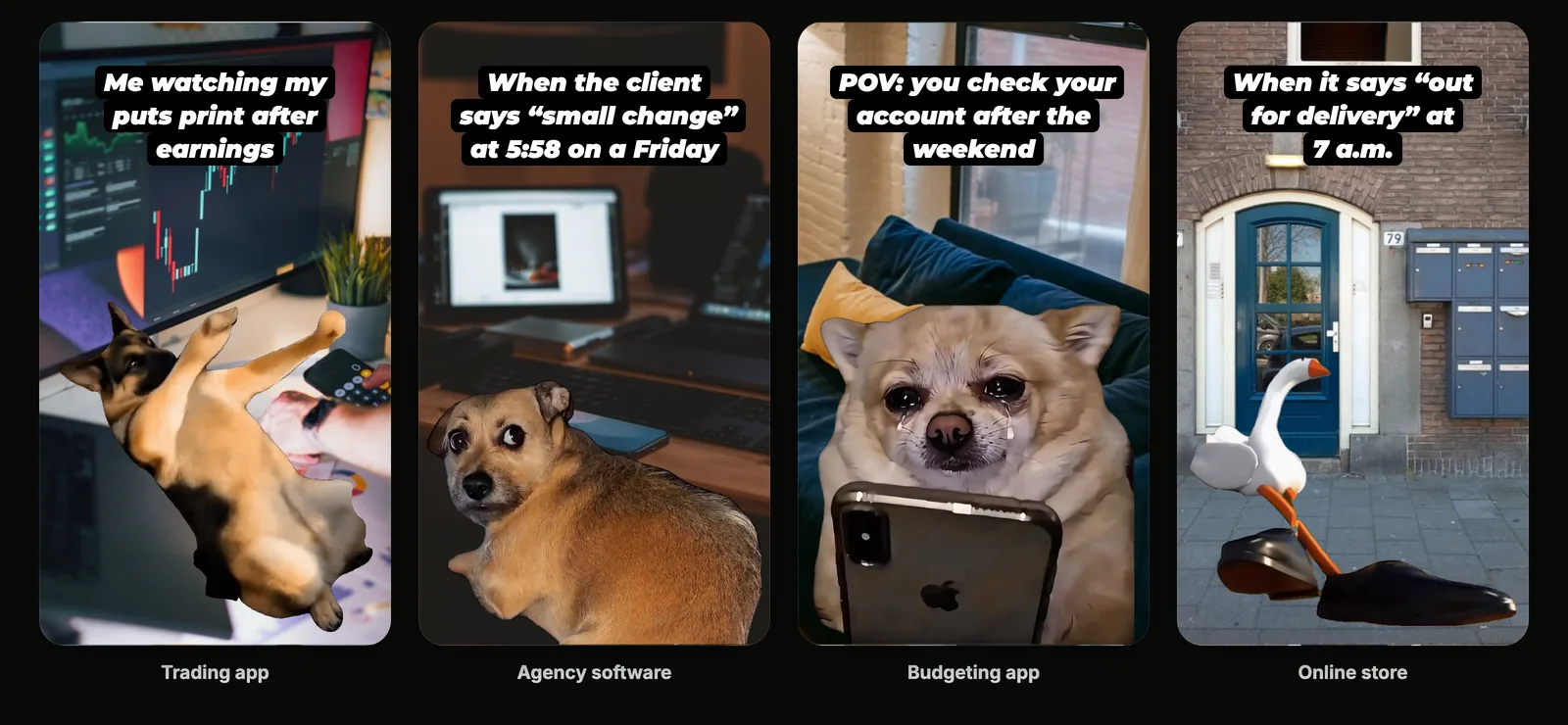
What it looks like for different businesses
| Business | Caption | Clip to search for | Over |
|---|---|---|---|
| Trading or market-data app | Me watching my puts print after earnings | "celebrating", "dancing" | The alert in your app |
| Agency software | When the client says "small change" at 5:58 on a Friday | "side eye", "shocked" | Your dashboard |
| Budgeting app | POV: you check your account after the weekend | "crying", "scared" | A balance screen |
| Online store | When it says "out for delivery" at 7 a.m. | "waiting", "impatient" | Your product photo |
| Coffee shop | When the oat milk runs out at 8:59 | "shocked", "panic" | Your counter (the coffee shop walkthrough) |
The pattern is the same every time: your customers' situation, not your slogan. "When the client says small change" gets shared; "Try our new project tracker" gets scrolled past. The product shows up in the scene and in the account that posted it.
The pipeline
List the moments
Write down situations your customers live through, in their words: the late invoice, the 3 a.m. alert, the client who says "small change". They are the setup of every joke.
Find the reaction
For each moment, search the library for the reaction to it ("shocked", "side eye", "slow clap", "crying"), not for the topic. Look at the thumbnail before choosing.
Write the caption
One or two short lines in a classic format: "When ...", "Me when ...", "POV: ...". The caption is the setup; the clip is the punchline.
Render the video
Key the clip over your screenshot, product photo or a plain background with FFmpeg, keep the clip's sound, and save a 1080×1920 MP4.
Check and post
Watch each one with the sound on, drop the misses, and post or schedule the rest to YouTube Shorts, Instagram Reels and TikTok.
Under the hood it is two calls and one FFmpeg command per video. Search by reaction:
export GSM_API_KEY=gsm_live_...   # free Sandbox key from https://api.greenscreenmemes.app/dashboard

curl -fsS -G -H "Authorization: Bearer $GSM_API_KEY" \
  --data-urlencode "q=side eye" --data-urlencode "limit=3" \
  https://api.greenscreenmemes.app/v1/memes > results.json

jq -r '.data[] | "\(.id)  \(.chromaKeyColor)  \(.durationSeconds)s"' results.json
Download the clip and key it over your picture with the caption on top (the FFmpeg guide explains each part):
# Signed link, good for about 6 hours: keep the file, not the link.
curl -fsSL -o greenscreen.mp4 "$(jq -r '.data[0].videoUrl' results.json)"ffmpeg -loop 1 -i background.jpg -i greenscreen.mp4 -filter_complex \
"[0:v]scale=1080:1920:force_original_aspect_ratio=increase,crop=1080:1920,setsar=1[bg];\
[1:v]chromakey=0x00ff00:0.2:0.05,scale=1080:-2[fg];\
[bg][fg]overlay=(W-w)/2:H-h:shortest=1,format=yuv420p,\
drawtext=text='when the invoice':fontcolor=white:fontsize=64:box=1:boxcolor=black:boxborderw=18:x=(w-text_w)/2:y=200,\
drawtext=text='arrives':fontcolor=white:fontsize=64:box=1:boxcolor=black:boxborderw=18:x=(w-text_w)/2:y=300[v]" \
-map "[v]" -map "1:a?" -c:v libx264 -crf 20 -c:a aac meme.mp4Agents connected over MCP get the same recipe from the get_green_screen tool, so you rarely type any of this yourself.
Three ways to run it
1. Ask ChatGPT or Claude
No code. One meme at a time.
- Add Green Screen Memes to ChatGPT or Claude as a connector (the URL is
https://api.greenscreenmemes.app/mcp) and sign in. - Ask: "Make a meme about our app's late-invoice reminders." It writes the joke, picks the clip and shows the meme in the chat.
- Edit & download opens it in the Green Screen Memes editor, where you can add your screenshot and export the video.
2. A coding agent
Batches of 10 to 100, on your machine.
- Claude Code:
/plugin marketplace add green-screen-memes/green-screen-memes-api, then/plugin install green-screen-memes@green-screen-memes. It adds the MCP server and the meme-making skill with a render script. - Cursor, Codex and others: connect the MCP server, with FFmpeg installed.
- Paste the daily prompt and point it at a folder of screenshots.
3. On a schedule
A batch every morning, without you.
- Run the same prompt headless with
claude -pfrom cron (below), a CI job or any scheduler. - Or import the n8n workflow from the examples repo: an AI step writes the ideas, HTTP steps fetch the clips, FFmpeg renders (self-hosted n8n).
- Add a posting step (YouTube Data API, Instagram Graph API, TikTok) or a message to Slack for a human check first.
# Every weekday at 9:00: the agent makes the day's batch (crontab -e).
# Assumes the MCP server was added as "green-screen-memes" (claude mcp add, on the MCP page).
0 9 * * 1-5  cd ~/meme-shorts && claude -p "$(cat daily-prompt.txt)" \
  --allowedTools "mcp__green-screen-memes,Bash(ffmpeg:*),Bash(curl:*),Read,Write" >> run.log 2>&1
A daily prompt to start from
Change the first two lines to your product and audience. Give it a few captions you like and words to avoid, and it will keep your voice.
You make our daily meme Shorts.
Our product: a budgeting app for freelancers. Audience: freelancers who hate admin.

Make 3 vertical meme videos for today:
1. Check what's trending (get_trending) and use a trending clip where one fits.
2. For each, pick a moment our audience lives through (an invoice paid late,
   tax season, a client's "quick change"), search for the reaction to it,
   look at the thumbnail, and write a short caption: "When ...", "Me when ...",
   "POV: ...". No hashtags in the video.
3. Key each clip over one of the screenshots in ./brand, keeping the clip's
   sound, and save a 1080x1920 MP4 to ./out/<today>/.
4. Write ./out/<today>/posts.csv: file, caption, clip, a post title and a
   one-line description for each.
Never use clips of identifiable people in anything we run as an ad.
Three things make the difference between memes people share and memes they skip: specific moments (a time, a number, a phrase your customers really say), a clip whose reaction is the punchline (look at the thumbnail first), and more takes than you post (make three, post the best one).
What it costs
A plan counts clip downloads, not videos, and the agent keeps every clip it downloads. Three Shorts a day comes to about 90 downloads a month at most.
| Plan | Price | Video downloads / month | API calls / month | Requests / minute | For |
|---|---|---|---|---|---|
| Sandbox | Free | 50 total | 30k | 120 | For building and testing |
| Starter | $49/mo | 2k | 100k | 120 | Use in apps and published videos |
| Growth | $199/mo | 20k | 1M | 600 | Use in apps and published videos |
| Enterprise | from $999/mo | 200k | 10M | 600 | Custom terms and uptime commitment |
In US dollars; yearly billing is 20% off. Searching and thumbnails don't use downloads. Nothing is billed past a plan: at the limit, downloads stop until the next month or an upgrade.
What you can use them for
These are internet memes: Green Screen Memes makes the green screen versions, but the original footage isn't ours and isn't licensed with the clips, so how you use one is up to you. On Starter and up you can publish videos with them, for yourself or clients. Don't put clips of identifiable people in paid ads, sponsored posts or endorsements; animals, objects and cartoons are fine there. The terms have the details.
Questions
Does this generate videos with AI?
No. Every video is a real meme clip from the library (most with the meme's own sound) keyed over your own picture, with a caption your agent writes. That is why they read as memes and not as AI video.
Do I need to code?
Not to start: in ChatGPT or Claude, ask for a meme about your product and open it in the editor. For daily batches you need a coding agent (Claude Code, Cursor, Codex) or n8n, FFmpeg on the machine, and a key; the agent writes and runs the commands.
Can it post for me?
Yes, if you give your agent or workflow access to the platform: the YouTube Data API for Shorts, the Instagram Graph API for Reels (business accounts), TikTok's Content Posting API. Many teams keep a human check before posting: it takes a minute and catches the jokes that miss.
How much does a daily Short cost?
A plan counts clip downloads, not videos. Three Shorts a day is at most about 90 downloads a month, fewer when clips repeat, so Starter ($49 a month, 2,000 downloads) covers a daily habit with lots of room. The free Sandbox key has 50 downloads to try it.
Can my product be in the video?
Yes, and it should: the clip is keyed over any image or video, so put it over your app's screenshot, your product photo or your store. The caption ties the moment to what you sell.
Can I run these as ads?
Organic posts on your own or your clients' accounts are fine on a paid plan. In paid ads, sponsored posts and endorsements, use only clips without identifiable people: animals, objects and cartoons are fine. See the terms.
Which agents work?
Anything that speaks MCP or can call a REST API: Claude (the app, Claude Code), ChatGPT, Cursor, Codex, n8n, or your own script.
Get a free key
Sandbox: 50 free video downloads and 30,000 calls a month, for building and testing.